
Git 使用总结
整理在使用 Git 过程中的一些总结。
merge / rebase
两者都是将其他分支上修改应用到当前工作分支上,不同的是 merge 会产生一个与 merge 相关的提交记录,而 rebase 则不会产生,除此之外,两者之间的 git flow 如下:
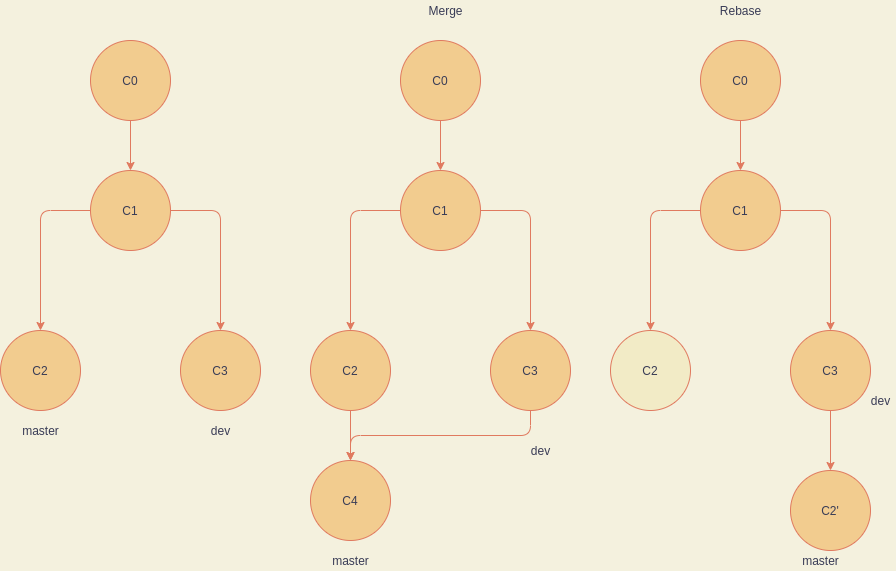
cherry-pick
用于将一些修改应用到当前工作的分支上:
1 | git cherry-pick <commitHash> | <HashA>..<HashB> |
上面的命令分别表示应用 <commitHash> 以及 (HashA, HashB] 到当前工作的分支上。
shallow update not allowed
这个问题的产生原因是在克隆远程仓库的时候采用了以下命令:
1 | git clone --depth=<num> <remote-url> |
这将会导致shallow clone(浅复制)。这将会使得这个仓库不能向远程仓库进行push。
通过以下命令可修复:
1 | git fetch --unshallow <remote-repo> |
镜像源
使用镜像源可以加速下载速度,常见的 Github 镜像源有:
可以在克隆的时候替换 https://github.com ,也可以通过全局设置,让 git 命令的 url 指向上述镜像源:
1 | git config --global url."https://hub.fastgit.org".insteadOf https://github.com |
本博客所有文章除特别声明外,均采用 CC BY-NC-SA 4.0 许可协议。转载请注明来自 zsStrike!